UAS Regulatory Overhead Control

Reduce regulatory overhead. Operate with proof.

FlightDocket helps UAS operators spend less time chasing paperwork, currency checks, permissions, FOMs, approvals, records and audit evidence — and more time flying. Operate runs every mission through one controlled evidence workflow. Apply builds the operating baseline once for applicants entering the same system.

Apply once · Operate every mission · Prove every flight

Get a quote Explore Operate How Apply works View FOM specimen

The flying is the easy part.
The regulatory overhead is what consumes the operating day.

Every UAS mission carries an administrative control chain: PIC currency, aircraft release, crew records, permissions, airspace, weather, NOTAMs, FOMs, support equipment, emergency contacts, approvals, acknowledgements, post-flight closure and evidence retention.

When that workload is managed through spreadsheets, email, WhatsApp, shared drives and memory, operators lose time before the flight and carry risk after it. FlightDocket turns that regulatory overhead into one controlled workflow.

Time drain
More admin than flying.
Currency checks, document chasing, FOM assembly, permissions, reviews and closure records consume operational capacity.
Hidden risk
One missing control can stop the mission.
Expired credentials, missing aircraft release, incomplete support equipment checks or stale weather evidence should be caught before the PIC reaches the field.
Audit pressure
The record must already exist.
When SACAA, a client, an internal accountable manager or a post-incident reviewer asks for proof, reconstruction from scattered tools is too late.

Stop rebuilding compliance from scattered tools.
Put the operating record in one place.

Before FlightDocket

Manual overhead, hidden gaps.

  • Spreadsheets for aircraft and PIC currency
  • Email and WhatsApp approvals
  • FOMs assembled manually from old data
  • Permissions and emergency contacts checked separately
  • Evidence reconstructed after the fact
With FlightDocket

One controlled evidence workflow.

  • Mission data enters one governed pipeline
  • Currency and release gates checked before approval
  • FOM generated from current mission evidence
  • PIC and crew receive the synced field pack
  • Closure, defects and audit records already exist

Operate is the platform.
Apply is the pathway into it.

FlightDocket Operate is the ongoing subscription product: mission governance, FOMs, approvals, field sync, credential surveillance and evidence retention. FlightDocket Apply is a once-off application and setup pathway that builds the same backend records for applicants who are not yet operating.

Primary product · ongoing subscription

FlightDocket Operate

For UASOC holders who need to control every proposed flight, reduce mission-by-mission admin, issue current FOMs, track crew and aircraft currency, and preserve defensible evidence.

  • Mission-readiness recommendation
  • Tenant approver workflow
  • FOM sync to PIC and crew phones
  • PIC mission open and closure record
Explore Operate →
Entry pathway · once-off purchase

FlightDocket Apply

For applicants who need a structured UASOC application, variation or setup path. Apply captures the same records, controls and evidence that Operate will use after approval.

  • Application scoping and data capture
  • OM / AMP / supporting document assembly
  • Evidence completeness checks
  • Review pack before submission workflow
Start Apply scoping →

Run every mission through a controlled chain.
Recommendation, approval, FOM, PIC open, closure.

Operate is the recurring value engine. The system collects and reviews the proposed flight data, then produces a mission-readiness recommendation. The tenant mission approver reviews the report and FOM content. If satisfied, they approve internally. The FOM syncs to the PIC and crew phones. The PIC performs the final review and opens the mission.
01
Proposed flight
Capture aircraft, PIC, crew, operating area, payload, time window, support systems and mission intent.
02
System recommendation
Check credentials, aircraft release, OpSpec scope, weather, airspace, NOTAMs, permissions, risk controls and evidence completeness.
03
Tenant approval
The mission approver reviews the recommendation, accepts or rejects findings, and approves internally under the operator's authority.
04
FOM sync
The approved mission FOM syncs to the PIC and crew mobile app on authorised phones or tablets, with the current evidence snapshot and validity window.
05
PIC open
The PIC confirms current conditions, aircraft, crew, support equipment and mission limits before opening the mission.
06
Closure archive
Post-flight checklists, notes, defects, deviations and closure records are sealed into the evidence archive.
No platform authorisation
FlightDocket recommends and records. The tenant approver approves internally. The PIC opens and executes. The platform is not a regulator, insurer, broker or underwriter, and no insurer or underwriter affiliation is claimed.
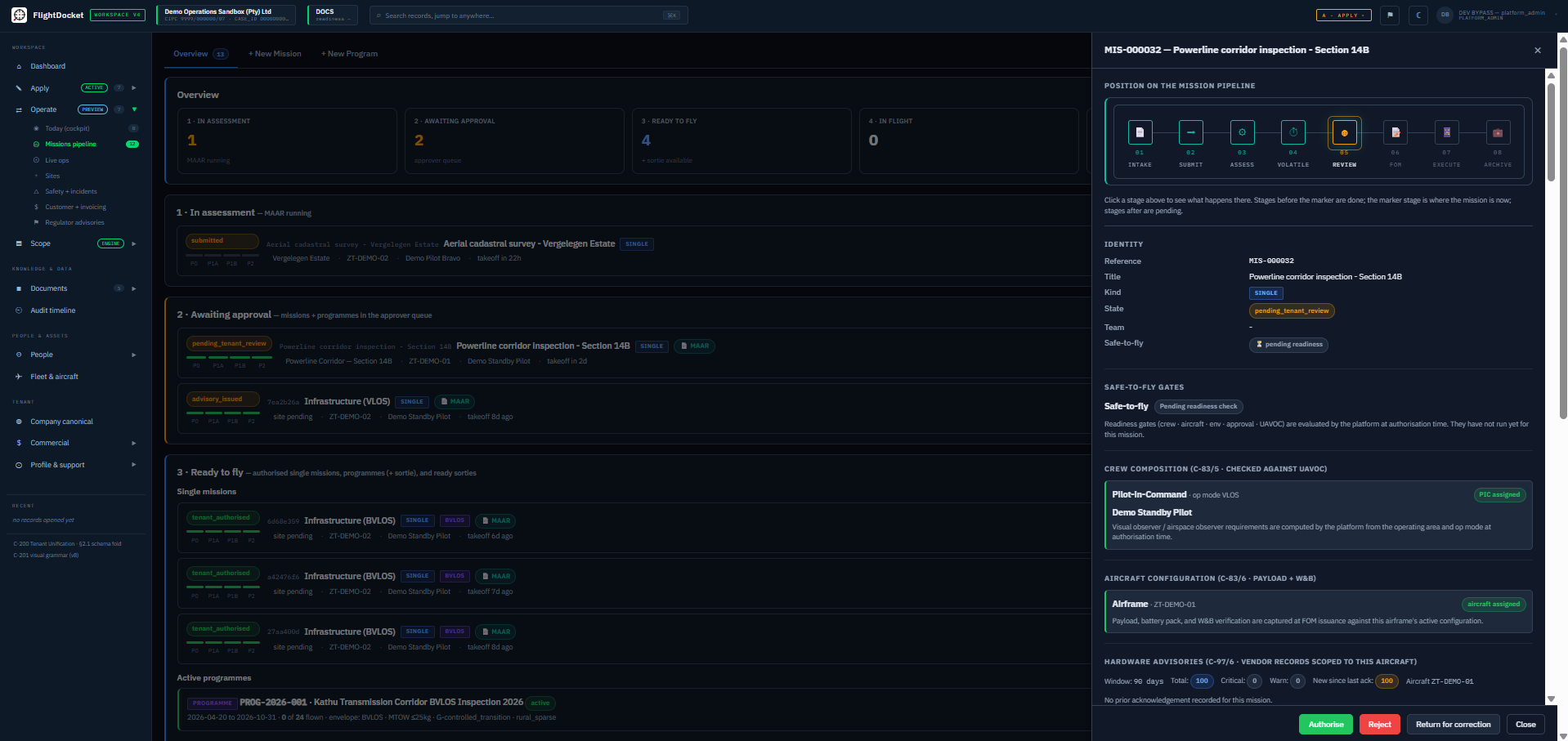
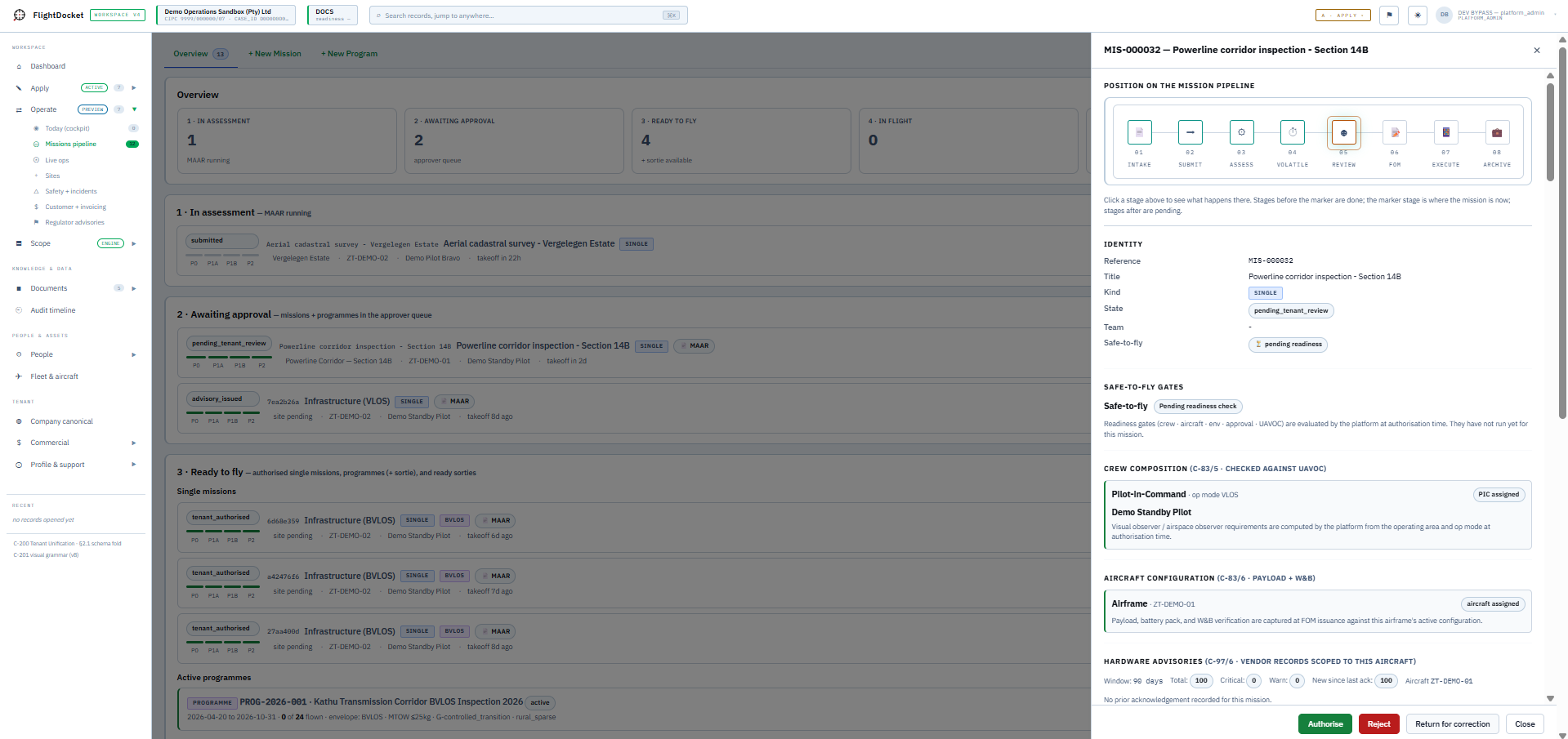
FlightDocket Operate · Mission Pipeline
FlightDocket Operate Mission Pipeline showing the mission lifecycle (in assessment, awaiting approval, ready to fly), pipeline overview metrics, and a selected mission's inspection panel with operating-rule cards, identity block and decision authorities. FlightDocket Operate Mission Pipeline showing the mission lifecycle (in assessment, awaiting approval, ready to fly), pipeline overview metrics, and a selected mission's inspection panel with operating-rule cards, identity block and decision authorities.
Captured from the Operate Mission Pipeline workspace.

Not operating yet?
Apply builds the baseline once.

FlightDocket Apply is the once-off pathway for new applicants and variation work. It structures the UASOC application journey while capturing the same definitive records that Operate later depends on: legal entity, post-holders, aircraft, pilots, manuals, AMP, SMS, support systems, operating limits and evidence files.

Apply is not a document pack that dies after submission. It is the setup path into live mission governance.
01
Scope the applicant
Capture entity, intended operations, aircraft class, PIC count, operating modes, documentation state and complexity triggers.
02
Build canonical records
Bind post-holders, aircraft, pilots, operating bases, insurance, maintenance, security and support-system evidence to reusable backend records.
03
Assemble and review
FlightDocket Apply builds a bespoke application dossier from the operator’s aircraft, personnel, operating model, procedures, evidence, support systems and regulatory scope. Documents are assembled from controlled source material, reviewed through structured specialist review stages, and checked against the loaded requirement map before release.
04
Transition to Operate
Once authority is granted and onboarding evidence is verified, the same records become the tenant's live Operate configuration.
Apply outcome
A structured, reviewable application/setup pack that does not die after approval. The applicant remains responsible for submission and the aviation authority remains responsible for approval.
View Phase III readiness specimen
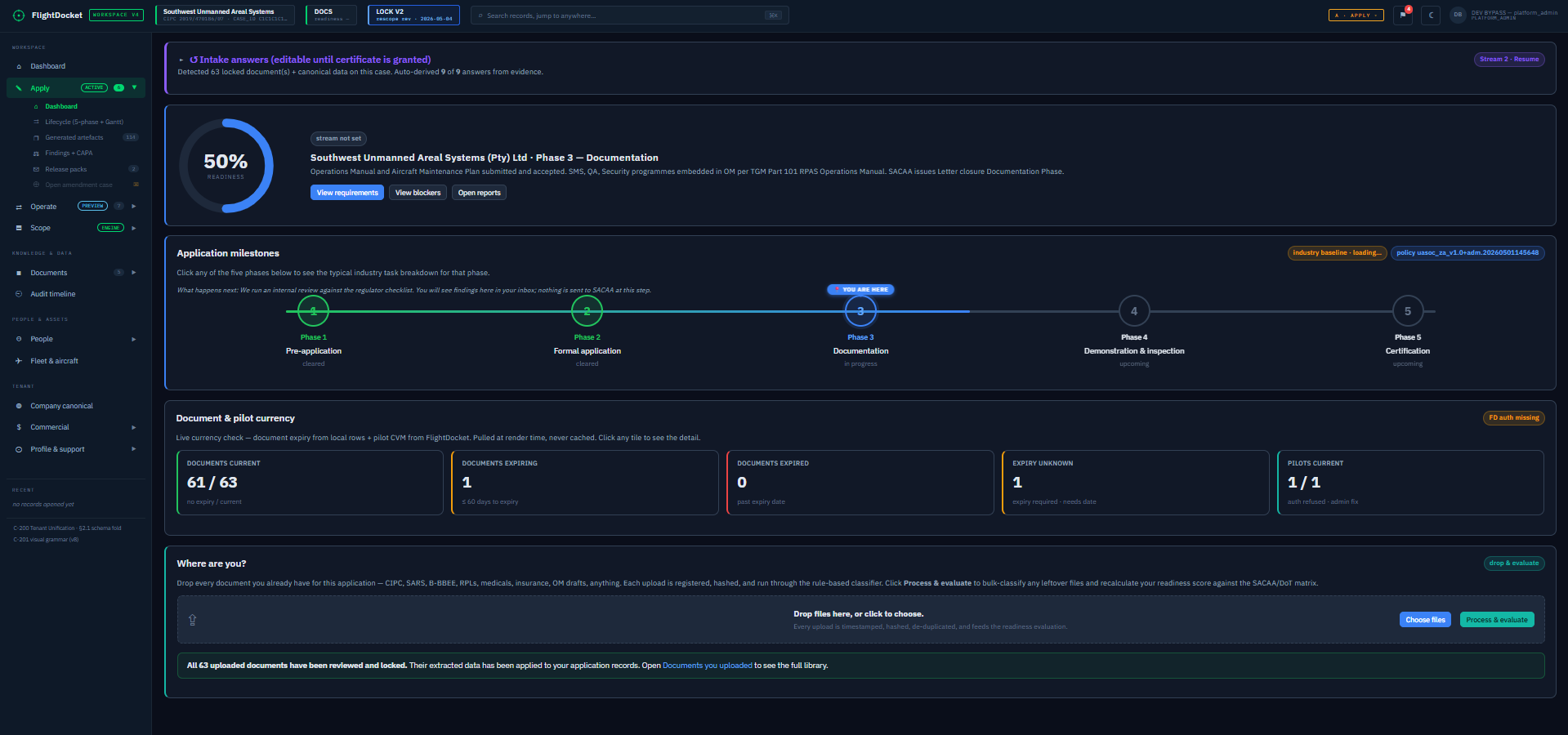
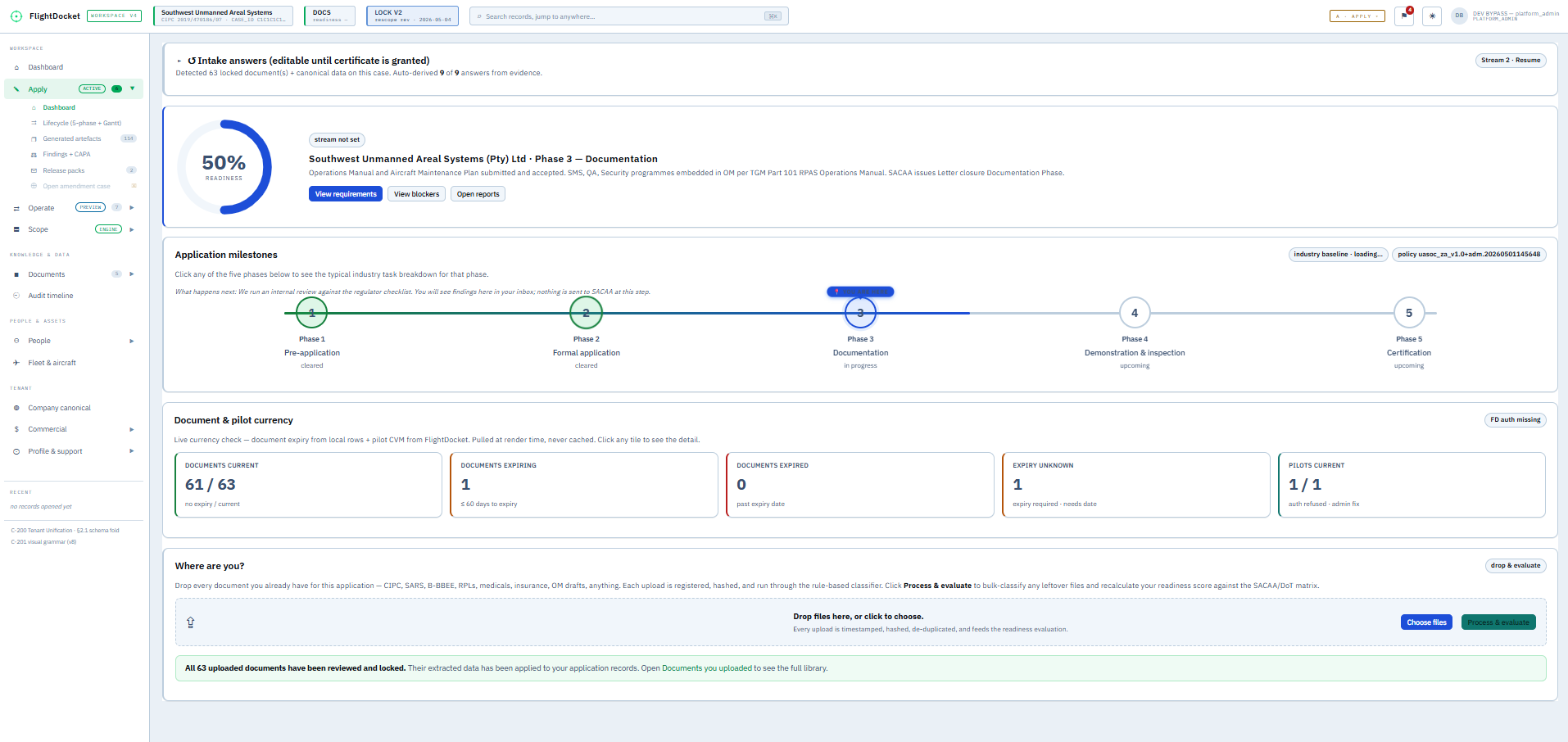
FlightDocket Apply · Applicant Workspace
FlightDocket Apply applicant workspace showing the 5-phase application milestone strip, document and pilot currency metrics, and the guided 'where are you?' position panel. FlightDocket Apply applicant workspace showing the 5-phase application milestone strip, document and pilot currency metrics, and the guided 'where are you?' position panel.
Captured from the Apply applicant workspace.

Apply data becomes Operate control.
No re-entry. No throwaway paperwork.

The same backend, rules, records, evidence controls and audit model serve both pipelines. Apply seeds the operating baseline. Operate uses it on every mission.

Baseline

Operator and authority records

Legal entity, post-holders, aircraft, PICs, manuals, AMP, SMS, support systems, insurance, limits and approvals are maintained as live controlled records.

Field

Mission Field Operations Manual

A mission-populated FOM generated from current data: weather, airspace, permissions, risks, contacts, emergency procedures, checklists, maps and validity windows.

Proof

Evidence archive

Every recommendation, approval, FOM issue, device sync, PIC open, checklist, closure and defect record preserved with traceability and integrity controls.

The question after a mission is not only whether you flew safely. It is whether you can prove the mission was controlled.
FlightDocket  /  Sales Principle 01

The PIC should never fly from scattered information.

After tenant approval, the mission FOM syncs to the PIC and crew mobile app on their authorised phones or tablets. The PIC reviews the current conditions, completes the required checks, and opens the mission from the field client before flight.

FLIGHT OPERATIONS MANUAL
REQUIRES REVIEW
FOM ReferenceFOM-XXXXXX-YYYYMMDD-vN
Mission IDxxxxxxxx-xxxx-4xxx-yxxx-xxxxxxxxxxxx
VersionN
IssuedYYYY-MM-DDThh:mm:ssZ
Valid UntilYYYY-MM-DDThh:mm:ssZ
Overall StatusAMBER
Go / No-GoGO WITH CAUTION
Critical Issues0
Warnings5
Ack. Pending1
ADVISORY DOCUMENT: This FOM was generated by FlightDocket following automated assessment and Tenant Approver sign-off. It consolidates validated mission parameters, operational readiness, and environmental data current at time of generation.
1. MISSION SUMMARY
Mission TypeInfrastructure
Flight RulesBVLOS
Pilot in Command[PIC name redacted]
AircraftZT-XXXXXX
Max Altitude AGL100 m
Waypoints102
Mission ModelSINGLE MISSION
ANONYMISED SPECIMEN
Mission Field Operations Manual

The final output of every mission assessment. A complete, defensible operational brief generated from live data — weather, airspace, hazards, radio scripts, checklists, and interactive maps. Ready to print, ready for the regulator.

Mission summary · Interactive satellite maps
ICAO 5×5 SMS hazard register · Radio call scripts
IMSAFE self-assessment · SACAA Part 101
Pre-flight checklists (Groups A–H)
View FOM specimen →
PHASE III PRE-SUBMISSION READINESS REPORT
READY FOR OPERATOR SIGN-OFF
Report ReferenceAPIII-RDY-XXXXXX-YYYYMMDD
Applicant[Operator name redacted]
PhaseIII — Documentation
Readiness Score94 / 100
Doc Families Met11 of 12
Open Findings2 SOFT
Hard Blockers0
Operator Sign-offPENDING
Submission LockUNLOCKED
READINESS REPORT: Anonymised public specimen showing readiness checks and cited reference families only. The pack itself and internal control logic are not displayed.
1. DOCUMENT-FAMILY COVERAGE
Operations Manual (OM A–D)MET
Aircraft Maintenance PlanMET
SMS · QA · SecurityMET
Post-holder credentialsMET
Aircraft register · airworthinessMET
Insurance scheduleSOFT
ANONYMISED SPECIMEN
Phase III Pre-Submission Readiness Report

The artefact the operator signs before the application pack is lodged. Document-family coverage, cited reference families, open findings, post-holder competence checks, hard-blocker count, and operator sign-off state — one page that says whether the pack is ready, and what stops it being ready if not.

Readiness score · Document-family coverage
Hard / soft findings register · Cited reference families
Operator sign-off + submission lock
SACAA Part 101 evidence map
View Phase III readiness specimen →
Public specimen state

Controlled mission states. No implied system approval.

Public samples and live FOMs use defined mission states: system recommendation, tenant approval, FOM synced, PIC open pending/opened. The platform must not collapse those into a vague or implied system-approved GO state.

System
Recommended for review
Tenant
Approved for PIC release
Device
Synced to PIC + crew
PIC
Open pending

Built for the people who carry the operational risk.

Accountable Manager

See the control posture before the question arrives.

Review mission evidence, open risks, credential exposure and closure state without reconstructing the operation from emails and spreadsheets.

Operations Manager

Control approvals, FOMs and currency gates.

Manage mission readiness, tenant approval, crew and aircraft status, support-system checks and post-flight closure through one workflow.

PIC / Crew

Receive the current field pack in the mobile app.

Use the synced FOM, checklists, emergency contacts, permissions, maps and mission limits on authorised phones or tablets before opening and closing the mission.

When the question comes, the record is already built.

FlightDocket preserves the decision trail behind every mission: who proposed it, what was checked, what was missing, who approved it, which FOM was issued, whether the PIC opened it, what changed in the field, and how the mission was closed.

Internal sign-offs along that chain — operator approval, post-holder acknowledgement, mission release and pack authorisation — are captured on the platform as Standard Electronic Signatures under the SA Electronic Communications and Transactions Act §13(2), bound to the underlying record. No separate e-signing subscription is required for routine internal sign-off.

That record helps the operator respond to SACAA review, client assurance, internal audit, post-incident reconstruction and insurance-related evidence requests. FlightDocket does not claim endorsement, affiliation or approval from any insurer, broker or underwriter.

Apply once.
Operate every mission.

Operate subscription

The primary product and recurring value.

For current UASOC holders. Tiered by aircraft, PICs and mission volume. Activated after operator authority and onboarding evidence are verified.

Get a quote →
Apply once-off purchase

The route into the operating backbone.

For new applicants or variations. Scoped from applicant profile, aircraft classes, operating modes, documentation maturity and review depth required.

Get a quote →

Stop letting regulatory overhead consume the flying day.

Request a quote in one click. Enter your company name and email and we’ll send a secure link to your quoting tool. Build your own scope, see a deterministic price, and engage FlightDocket only when you’re ready.

Self-service quoting
You enter company name and email
We email a secure link to your quoting tool
You build the quote and engage when ready
No tenant created · No card requested · POPIA-compliant